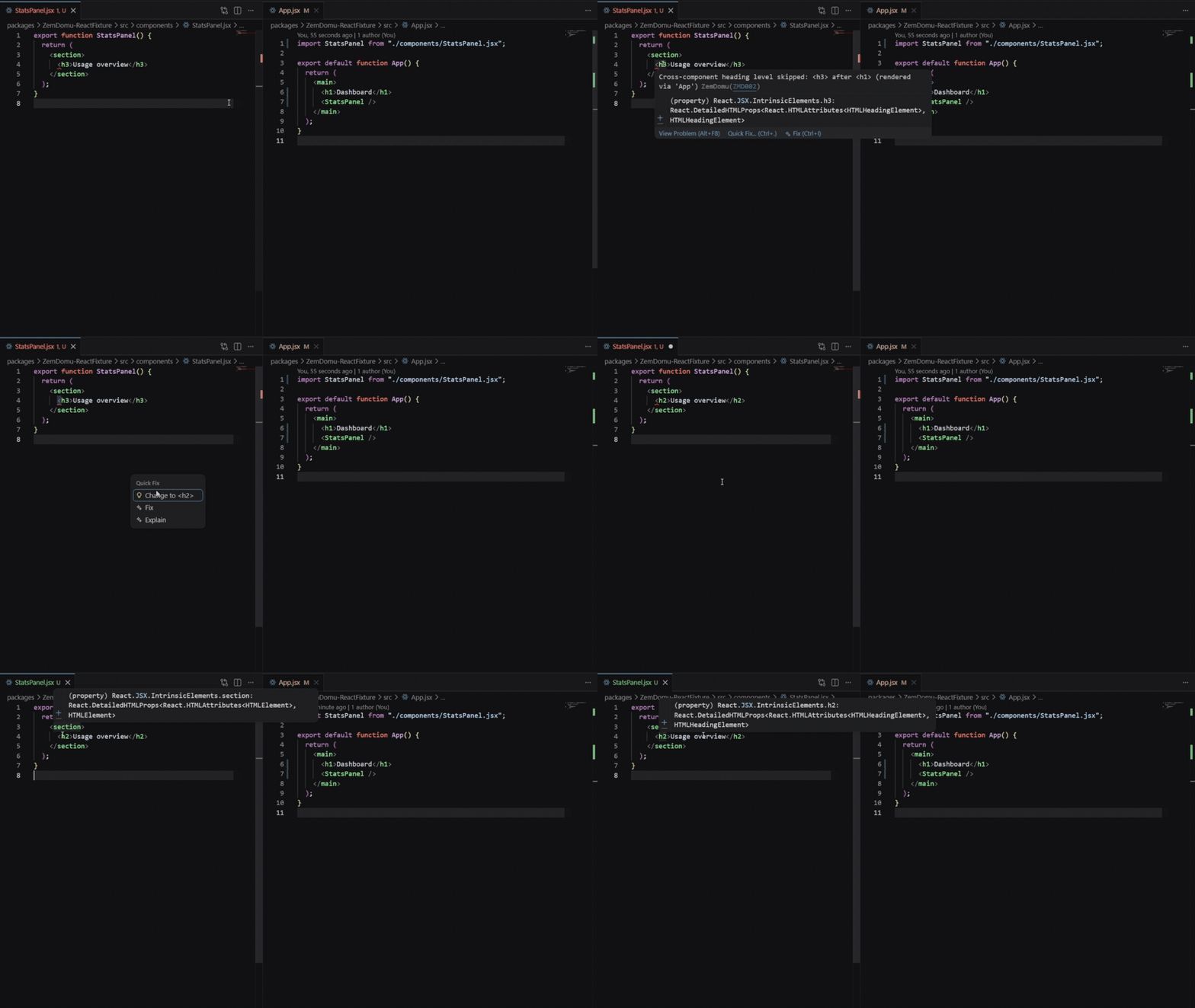
ZemDomu semantic linting
Find exactly where semantic mistakes originate, even when buried deep in your component tree. Catch missing landmarks, improper heading order, unlabeled images, and empty tags before they reach a scanner report.
VS Code extension
Get instant feedback as you type, with inline diagnostics and a consistent view in the Problems panel.
Command palette
ZemDomu: Scan Workspace for Semantic Issues
Run this when you want a full project sweep.
CLI workflows
Use the CLI to lint file globs, run pre-commit checks, or plug into your build pipeline.
CLI example
npx zemdomu "**/*.{html,jsx,tsx,vue}"npx zemdomu "src/**/*.tsx" --cross --cross-depth 3GitHub Action
Add a single workflow step to block merges when semantic violations are detected.
Workflow snippet
name: ZemDomu SEO Guard
on: [pull_request]
jobs:
zemdomu:
runs-on: ubuntu-latest
steps:
- uses: actions/checkout@v4
- uses: Zemdomu/ZemDomu-action@main
with:
files: |
**/*.{html,jsx,tsx,vue}Cross component analysis
Trace semantic issues across imports so you can spot missing landmarks and heading order breaks across components.
API example
import { ProjectLinter } from "zemdomu";
const linter = new ProjectLinter({
crossComponentAnalysis: true,
crossComponentDepth: 3,
});
await linter.lintFile("App.jsx");SEO and accessibility
ZemDomu focuses on semantics that matter for accessibility and search visibility, so you can ship with confidence.
Rules library
Rules index preview
Scan the rules by category or jump straight to the full index.
Structure and headings
Outline, sections, and document hierarchy.
Links and navigation
Anchor clarity, destinations, and navigation intent.
Forms and controls
Labels, buttons, and keyboard access.
Media and embeds
Images and embeds with the right metadata.
Lists, tables, and integrity
Structure, captions, empty tags, and ID uniqueness.
FAQ and support
HTML, JSX, TSX, and Vue templates are supported across the extension, CLI, and GitHub Action. See installation options.
Use the CLI --cross flag or enable cross component analysis in the extension settings. Review the rules.
Yes. Use the CLI or API integration to supply custom rule modules. See the core repo.
Open an issue or start a discussion on GitHub.